
Subscription, usage and AI credits
Assinatura (subscription) shows the account's plan, how much of it is in use, the AI credits and the charges, and it is where the plan is subscribed to, changed or cancelled. It is under Configurações › Assinatura (settings › subscription), and only the account administrator sees it. It has three tabs: Meu Plano (my plan), Créditos IA (AI credits) and Registros (logs).
The account subscribes with a credit card or Pix Automático (automatic Pix). Older accounts, which subscribe through Stripe, have a few different screens, explained in Accounts that subscribe through Stripe.
Subscribing
Every new account starts on the 15-day free trial, with no card, as described in Creating the account. During it, a banner at the top of the screens counts the days left ("Seu teste grátis acaba em 5 dias.", your free trial ends in 5 days) and suggests the plan that fits what the account already uses.
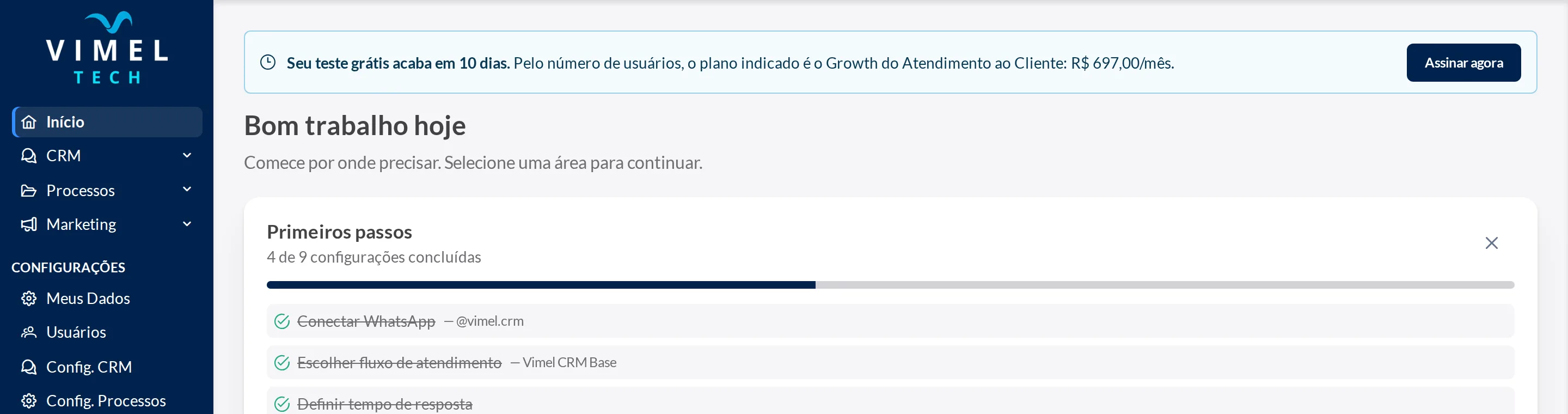
Assinar agora (subscribe now), on the banner or in Meu Plano, opens the subscribe screen:
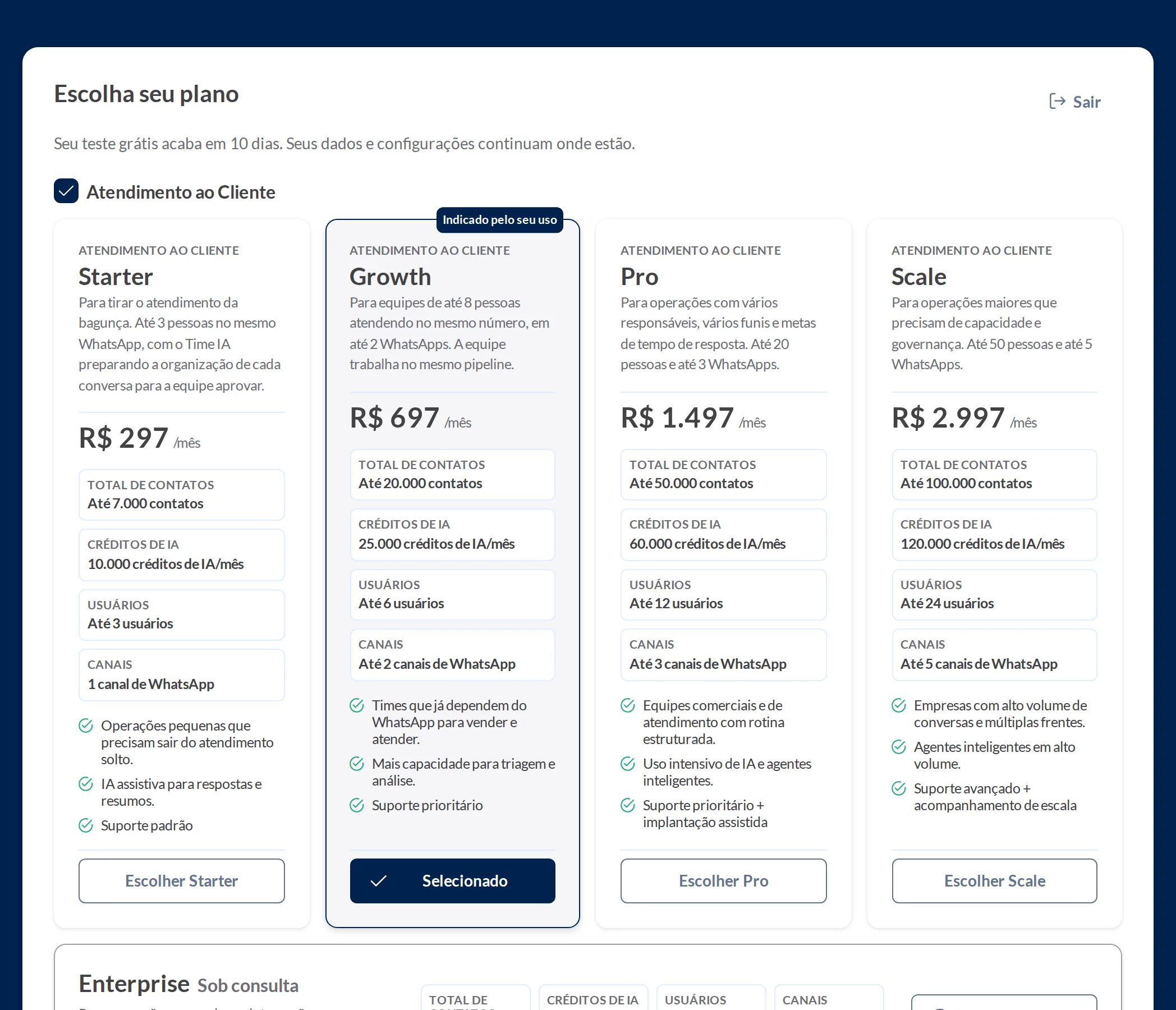
- The plans: one per module, ticked to be included in the subscription. The plan that fits your usage comes pre-selected, with the Indicado pelo seu uso (suggested by your usage) badge.
- Add-ons opcionais (optional add-ons): extra users, WhatsApp connections or AI credits, each with its monthly price.
- Cupom de desconto (discount coupon): type the code and Aplicar (apply). The screen says how many monthly payments it applies to. The coupon only applies to the monthly payment, not to a plan-change adjustment or a credit pack.
- Forma de pagamento (payment method): Cartão de crédito (credit card), charged automatically every month, or Pix Automático, authorised once in the bank app and debited every month.
- Resumo da assinatura (subscription summary): the monthly total. If the choice does not cover what the account already uses (more users or connections than the plan has), the screen warns Esta escolha não cobre o que a conta já usa. (this choice does not cover what the account already uses) and does not let you continue until the plan or the add-ons are adjusted.
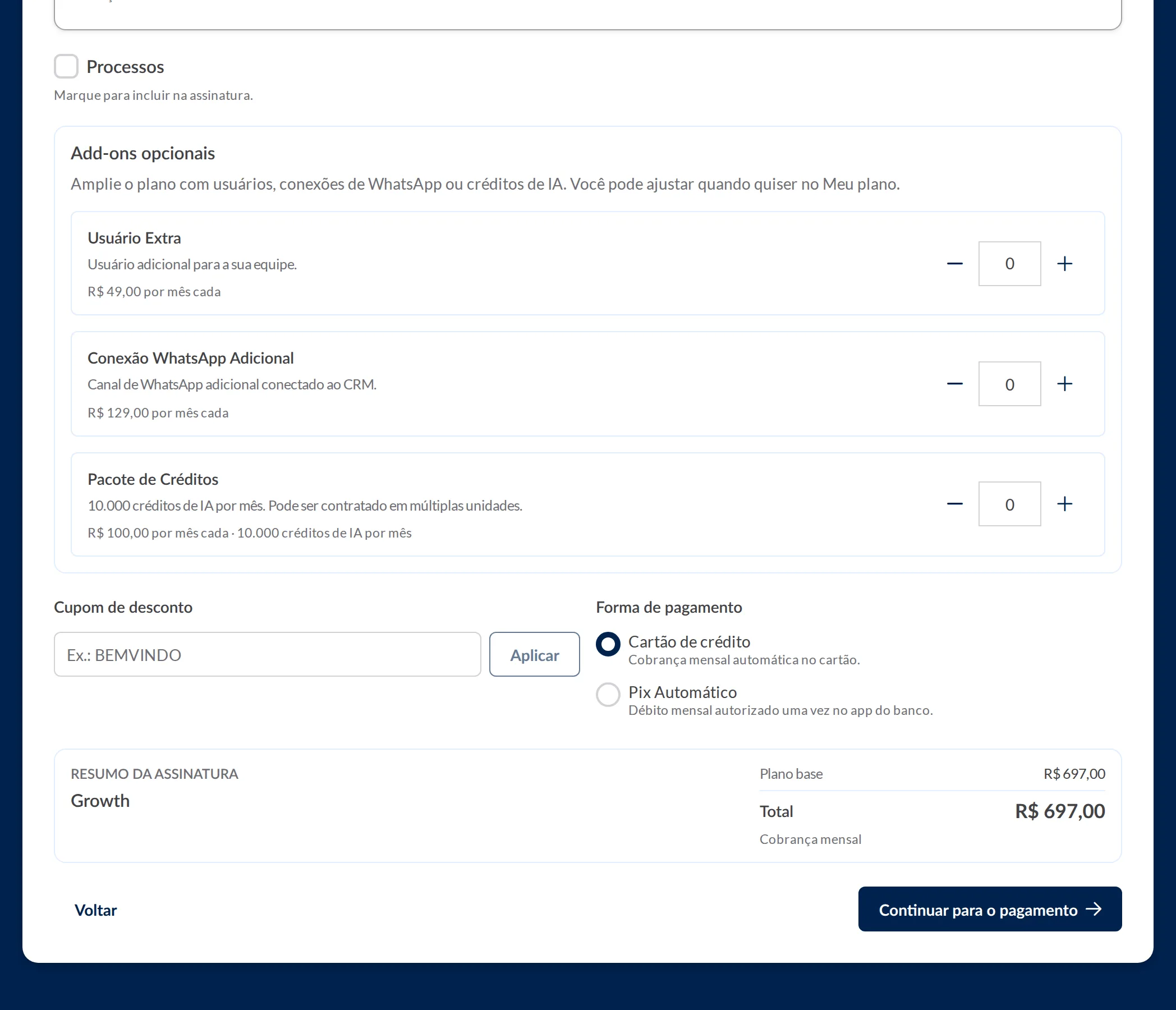
With a card, Continuar para o pagamento (continue to payment) takes you to the payment page of Asaas, our billing partner, where you enter the card. On the way back, Vimel waits for the confirmation and releases the plan by itself; if it takes a while, access is released as soon as it arrives, even with the page closed.
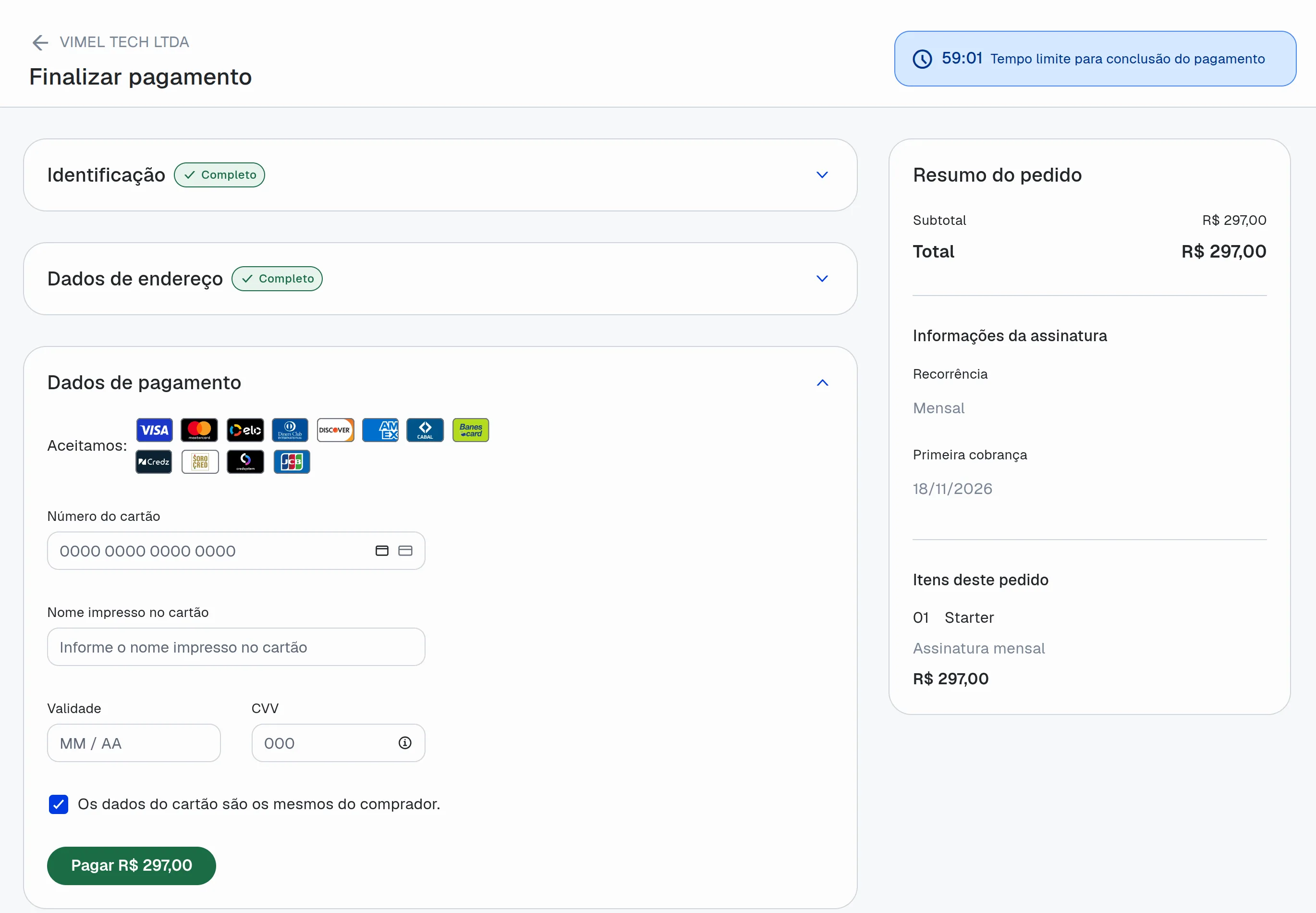
The identification and the address come from the account's details. The summary, on the right, shows the monthly recurrence and the date of the Primeira cobrança (first charge), which is today. The page has a time limit; if it runs out, go back to Vimel and start again.
With Pix Automático, Gerar QR do Pix Automático (generate the Pix Automático QR) shows the QR and the Pix copia e cola (copy-and-paste Pix code) for the first monthly payment. Pay in your bank app: in the same step, the bank asks you to authorise the debit of the following monthly payments. The screen releases by itself when the payment is confirmed; Já paguei, verificar (I have paid, check) forces the check. The authorisation can be cancelled in the bank app whenever you want.
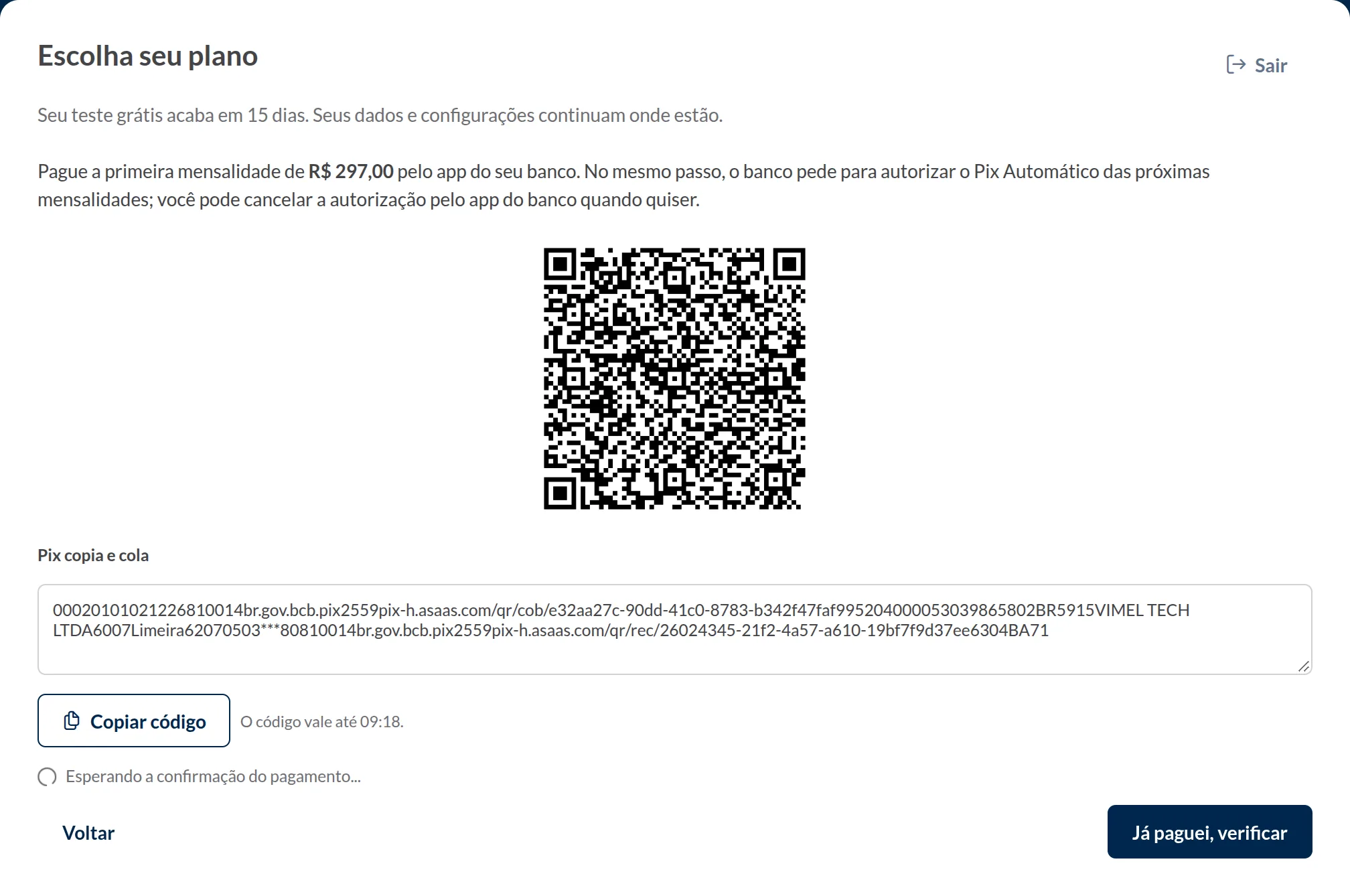
The code expires, and the screen says until what time it is valid.
The first monthly payment is charged on the day you subscribe, and the monthly cycle starts on that day. Subscribing in the middle of the trial ends the trial on that day: the remaining days are not added to the first month.
A coupon that brings the amount to zero. If the coupon takes the monthly payment below R$ 5.00, there is nothing to charge now: the button becomes Começar sem cobrança (start without a charge), and the plan is released straight away. Vimel asks for the card or Pix Automático before the first monthly payment with an amount.
The trial ended without a subscription
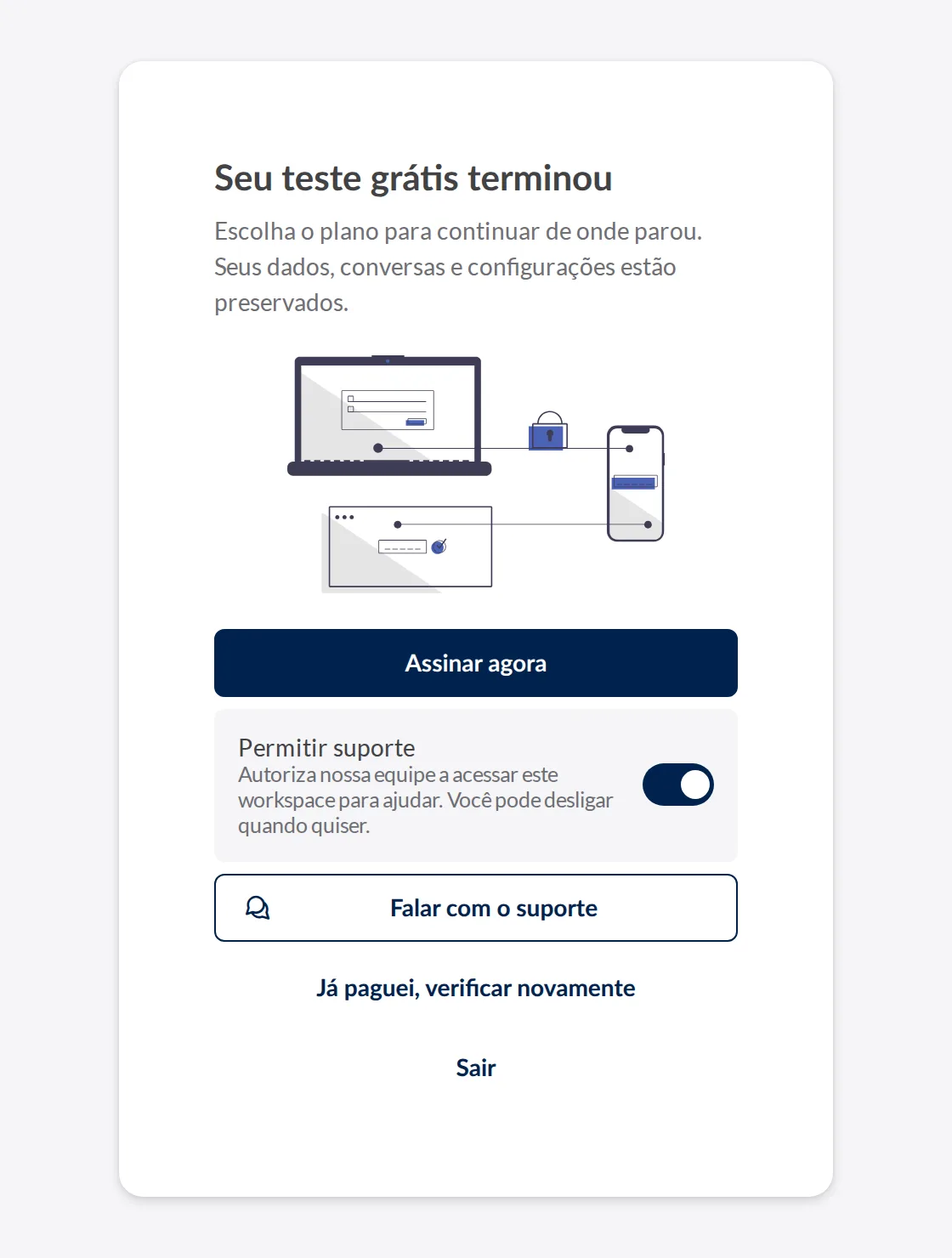
At the end of the 15th day, the account's access is suspended until someone subscribes: the administrator sees Seu teste grátis terminou (your free trial has ended) and Assinar agora, and the rest of the team sees a notice to talk to them. Nothing is deleted: conversations, cases, settings and connections stay as they were, and everything comes back on subscribing.
Three days and one day before the end, the administrator gets a reminder e-mail with the link to subscribe.
Meu Plano
Minha assinatura (my subscription) shows each module's plan and the Ativa (active) badge, or Cancelamento agendado (cancellation scheduled). Beside it:
- Forma de pagamento (payment method): Cartão de crédito or Pix Automático. Whoever started with a coupon that brought the amount to zero sees Ainda não cadastrada (not set up yet), with Cadastrar (set up).
- Próxima cobrança (next charge): the date and the amount.
- Saldo (balance), when there is one: a credit or a small difference that goes into the next monthly payment.
- Cupom (coupon), when there is one, with how many monthly payments it still covers.
Below come Uso do plano (plan usage), with a bar for each measure of the plan, Contatos (base) (contacts), Créditos de IA (mês) (AI credits per month), Usuários (users) and Canais de WhatsApp (WhatsApp channels), and Cobranças e notas fiscais (charges and invoices).
In an account with both the CRM and Processos, users have one bar per module, Usuários do CRM and Usuários do Processos: whoever uses both counts in both, as described in Users and permissions. The contact base adds up valid contacts and groups. From 80% the bar says Perto do limite (close to the limit), and at 100%, Limite atingido (limit reached).
Cobranças e notas fiscais lists the account's charges: the first monthly payment, the monthly payments, plan-change adjustments and credit packs, each with its status (Aguardando pagamento, awaiting payment; Pago, paid; Vencida, overdue; Estornada, refunded) and the Fatura (bill) and Nota fiscal (tax invoice) links. The tax invoice for each payment also arrives by e-mail.
Changing the plan
Alterar plano (change plan) opens the same choice of plans and add-ons. The screen shows the effect before you confirm:
- moving up a plan takes effect immediately, with a charge proportional to the days left in the cycle ("Cobrado agora: R$ …, proporcional aos dias até …", charged now, proportional to the days until …);
- moving down a plan takes effect at the next cycle, and nothing is charged now.
A scheduled change shows in Meu Plano, under A partir do próximo ciclo (from the next cycle). On a Pix Automático subscription, the proportional charge for moving up comes in a separate QR, to pay straight away.
Cancelling
Cancelar assinatura (cancel subscription) cancels the whole subscription, at the end of the cycle:
- until the date shown, everything keeps working, and nothing more is charged afterwards;
- no data is deleted: conversations, cases, processes and files are kept;
- until that date, Reativar assinatura (reactivate subscription) undoes the cancellation.
After the date, Vimel shows Assinatura cancelada (subscription cancelled) and Assinar novamente (subscribe again); access comes back with the new subscription, and the data is still there.
AI credits
Whatever uses AI in Vimel spends credits: the AI Team, suggesting and improving replies in conversations, audio transcription, dictation, the suggested description of a pipeline and a stage, and the chat and documents in the Processos module. The cost of each use depends on the size of the work, not on a fixed table per action.
The month's quota is the plan's plus the credit add-ons. It restarts at the beginning of each month and does not accumulate: what is left over in one month does not carry to the next. The free trial is different: 1,000 credits for the whole trial, and when they run out the trial banner says so and suggests the plan.
The Créditos IA tab shows the period's consumption, with what was Utilizado (used) and the Restante (remaining); there, Disponível (available) is the month's whole quota. Below, Consumo por usuário (consumption per user) adds up what each person spent, with a date filter.
Pacotes avulsos (one-off packs). So as not to stop mid-month, Comprar (buy) a pack on the Créditos IA tab. The pack's credits are valid for 90 days and are only used once the month's quota runs out. The charge is made straight away, separately from the monthly payment: on the subscription's card, or through a Pix QR. Packs are available after subscribing, not during the trial.
When the credits run out, AI actions stop until the month turns. Whoever tries to use them gets a notice such as "Os créditos de IA do mês acabaram. Fale com o administrador da conta." (the month's AI credits have run out; talk to the account administrator). The AI Team in the background and automatic transcription stop by themselves. The rest of Vimel keeps working: conversations, the board, the calendar and campaigns.
The AI Team also has its own daily limit for background work, explained in its article.
Registros
The Registros tab lists each use of AI by the team: the date, who used it, the feature, the case, the flow, the pipeline and the credits spent. Detalhes (details) shows the model, the tokens and the text that was sent to the AI and what it returned. With the Processos module, there are also the Conversas com Documento (conversations with a document) and Documentos Gerados (generated documents) tabs.
Late payment
If the monthly payment is not paid on the due date, the account has 7 days to settle it. During that time everything works, and a banner at the top of every screen counts the days left. For the administrator, it carries Pagar a fatura em aberto (pay the open bill), which opens the bill at Asaas to pay by card or Pix; for the rest of the team, it asks them to tell the person responsible for the subscription.
Once the period is over, access is suspended: the team sees Acesso temporariamente suspenso (access temporarily suspended), and the administrator, the open bill to pay. Access comes back as soon as the payment is confirmed, and the days with access suspended are not charged. The data is not deleted. Whoever has already paid uses Já paguei, verificar novamente (I have paid, check again).
On the suspension screen, Permitir suporte (allow support) authorises the Vimel team to enter the account to help, and it can be switched off whenever you want.
Accounts that subscribe through Stripe
Accounts created before sign-up through Asaas stay on Stripe, with the card registered at creation, and nothing changes for them. In those accounts:
- Meu Plano shows Total da assinatura (subscription total) and Módulos ativos (active modules), each module with its amount, and Pagamentos recentes (recent payments), with the last 12 invoices and Ver fatura (view invoice);
- Atualizar assinatura (update subscription) opens the wizard with the current modules and plan, and on confirming you choose Aplicar agora (apply now), with the difference charged proportionally, or Próximo ciclo (next cycle);
- each module is cancelled separately, under Cancelar (cancel) and the module's name, also at the end of the cycle;
- when payment is late, the banner carries Regularizar pagamento (settle payment), which retries the saved card or takes another card.
Limits worth knowing
- Only the account administrator sees Assinatura and can subscribe. The rest of the team does not see plans, amounts or charges.
- Amounts come from the contracted plan: this page does not show prices.
- Cobranças e notas fiscais shows the 36 most recent charges.